ShopDreamUp AI ArtDreamUp
Deviation Actions



Suggested Deviants


Suggested Collections


You Might Like…


Featured in Groups




Description
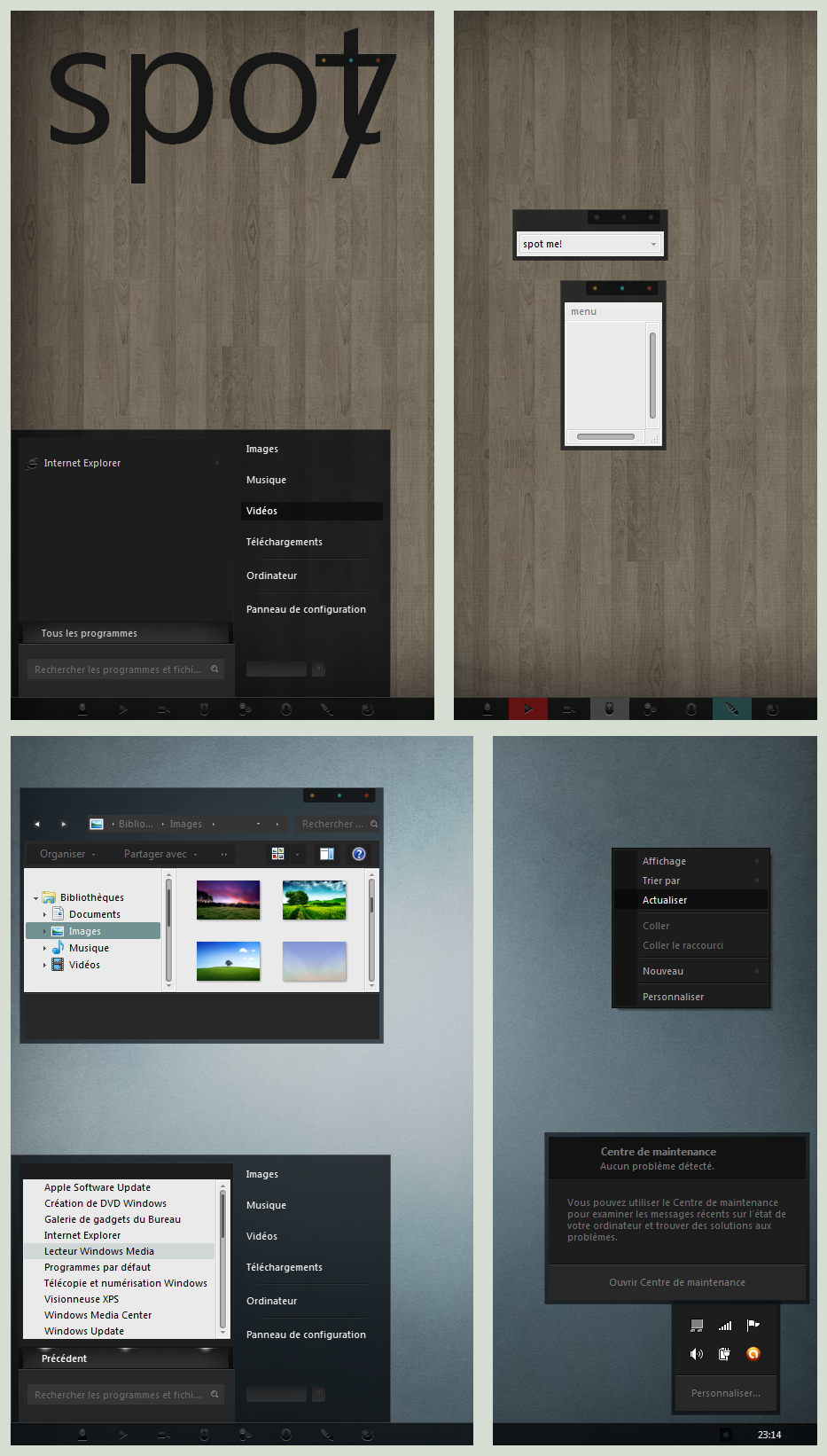
Spot for Win7 aero. 2 style : aero and solid theme.
------ update 08/03/10 ---------
change window background from gray to white.
--------------------------------------
for the start button you can find here at DA a lot of great start button or leave the theme with my default blank one.
----------------------------------------------------------
- You need a patched system for using theme : [link] or : [link]
- Place the theme in your x:\Windows\Resources\Themes folder.
- For the StartButton you have to replace Explorer.exe in your Windows directory, for help : [link]
- Replace the explorerframe.dll in your x:\Windows\System32
---------------------------------------------------------------------
** Wall's :
- at top : [link] (Trae by GuituX)
- at bottom: [link] (NEVA by Digitalshiva)
** icons : [link] (token by brsev)
------------------------------------------------------------------------------
If you don't like the color of the taskbar buttons follow this mini tutorial:
with [link] (restuner) :
open spot.msstyle , go to image folder and replace png: 1150 , 1151, 1152, 1153.
edit these png's with your photo editor.
don't forget to save.
reboot spot theme.
with [link] (vsb):
open spot.msstyle, go to:
windows 7 > taskbar & tray notify > basic > taskbar > taskitembuttom ( replace png 1150)
windows 7 > taskbar & tray notify > basic > taskbar >uncombinedtaskitemleft ( replace png 1151)
windows 7 > taskbar & tray notify > basic > taskbar >uncombinedtaskitemcenter ( replace png 1152)
windows 7 > taskbar & tray notify > basic > taskbar >uncombinedtaskitemright ( replace png 1153)
save after that.
------------------------------------------------------------------------------
For Cd art display skin : [link] (spot for cad)
thanks to everyone for your support, kind comments & of course your ...
... 

------------------------------------------------------------------------------------
Copyright /Creative Commons Attribution-Noncommercial-Share Alike 3.0 License.
------ update 08/03/10 ---------
change window background from gray to white.
--------------------------------------
for the start button you can find here at DA a lot of great start button or leave the theme with my default blank one.
----------------------------------------------------------
- You need a patched system for using theme : [link] or : [link]
- Place the theme in your x:\Windows\Resources\Themes folder.
- For the StartButton you have to replace Explorer.exe in your Windows directory, for help : [link]
- Replace the explorerframe.dll in your x:\Windows\System32
---------------------------------------------------------------------
** Wall's :
- at top : [link] (Trae by GuituX)
- at bottom: [link] (NEVA by Digitalshiva)
** icons : [link] (token by brsev)
------------------------------------------------------------------------------
If you don't like the color of the taskbar buttons follow this mini tutorial:
with [link] (restuner) :
open spot.msstyle , go to image folder and replace png: 1150 , 1151, 1152, 1153.
edit these png's with your photo editor.
don't forget to save.
reboot spot theme.
with [link] (vsb):
open spot.msstyle, go to:
windows 7 > taskbar & tray notify > basic > taskbar > taskitembuttom ( replace png 1150)
windows 7 > taskbar & tray notify > basic > taskbar >uncombinedtaskitemleft ( replace png 1151)
windows 7 > taskbar & tray notify > basic > taskbar >uncombinedtaskitemcenter ( replace png 1152)
windows 7 > taskbar & tray notify > basic > taskbar >uncombinedtaskitemright ( replace png 1153)
save after that.
------------------------------------------------------------------------------
For Cd art display skin : [link] (spot for cad)
thanks to everyone for your support, kind comments & of course your
... ------------------------------------------------------------------------------------
Copyright /Creative Commons Attribution-Noncommercial-Share Alike 3.0 License.
Comments298
Join the community to add your comment. Already a deviant? Log In
Great work